Tagalog
Tagalog
English
Chinese (China)
Chinese (Hong Kong)
Indonesian
Malay
Polish
Portuguese
Spanish
Thai
Arabic
Vietnamese
Pag-Login
Tahanan
App Marketplace
Gabay Ng Produkto
Pagsasanay
Product News
Tahanan
App Marketplace
Gabay Ng Produkto
Pagsasanay
Product News
Makipag-Ugnay Sa Amin
Tahanan
App Marketplace
Gabay Ng Produkto
Pagsasanay
Product News
Makipag-Ugnay Sa Amin
Tahanan
App Marketplace
Gabay Ng Produkto
Pagsasanay
Product News
Makipag-Ugnay Sa Amin
Pagdaragdag ng isang Bagong File
Tahanan
Ng Produkto Ng Mga Gabay
MiFleet
File
Pagdaragdag ng isang Bagong File
Pagdaragdag ng isang Bagong File
Na-update noong Setyembre 5, 2025
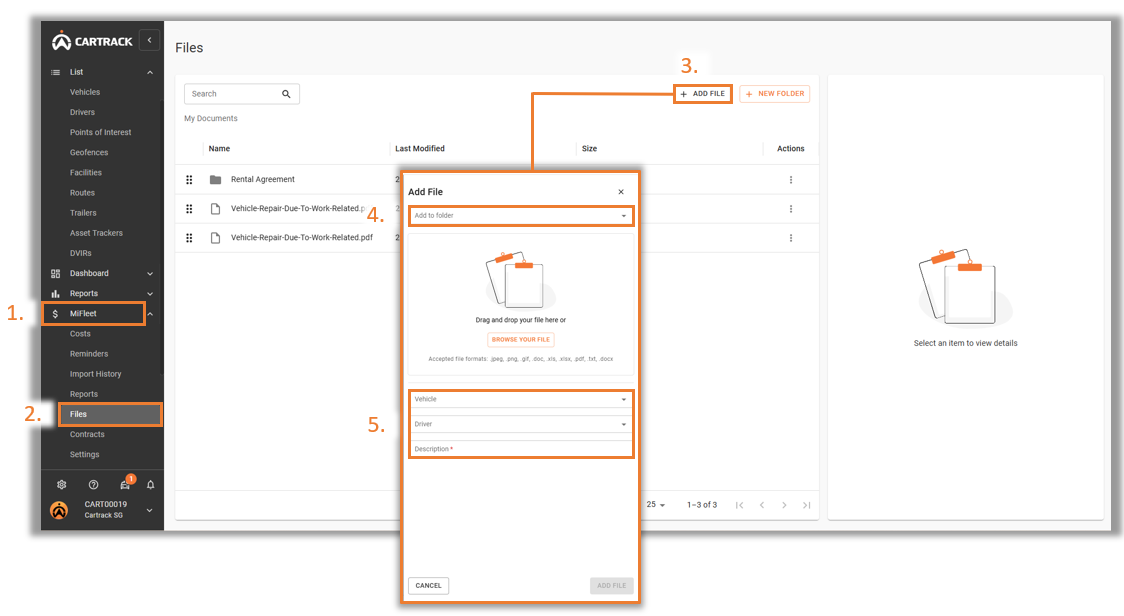
Navigate to the
“MiFleet”
tab.
Select the
“Files”
tab under MiFleet.
Click on the
“Add File”
icon to add a new file.
Select the folder you want to add the file in.
Drag and drop or select the file from the computer, select the fields, and input the file description.
“Add file”.
Ay artikulong ito ay kapaki-pakinabang?
"
*
" indicates required fields
Ay artikulong ito ay kapaki-pakinabang?
Sagot
Oo
Walang
Email
*
Bansa
*
Select Country
Australia
Botswana
Kenya
Malawi
Hong Kong
Indonesia
Mozambique
South Africa
Namibia
New Zealand
Malaysia
Nigeria
Philippines
Poland
Portugal
Rwanda
Singapore
Spain
Swaziland
Tanzania
Thailand
United Arab Emirates
Vietnam
Zimbabwe
Mensahe
*
Pagsang-ayon
*
Nangangako kami upang i-play maganda na may ang iyong email address. Tingnan ang aming mga
patakaran sa privacy
(Kinakailangan)
CAPTCHA
Phone
This field is for validation purposes and should be left unchanged.
Ibahagi Ang Mga Artikulo :
tuktok
Simplifying IT
for a complex world.
App Marketplace
Gabay Ng Produkto
Pagsasanay
App Marketplace
Gabay Ng Produkto
Pagsasanay
Platform partnerships
AWS
Google Cloud
Microsoft
Salesforce
 Tagalog
  English
  Chinese (China)
  Chinese (Hong Kong)
  Indonesian
  Malay
Malay  Polish
  Portuguese
  Spanish
  Thai
Thai  Arabic
  Vietnamese