Tagalog
  English
  Chinese (China)
  Chinese (Hong Kong)
  Indonesian
  Malay
Malay  Polish
  Portuguese
  Spanish
  Thai
Thai  Arabic
  Vietnamese
Vehicle Groups can be created to generate reports and set alerts to a specific set of vehicles rather than the whole fleet.
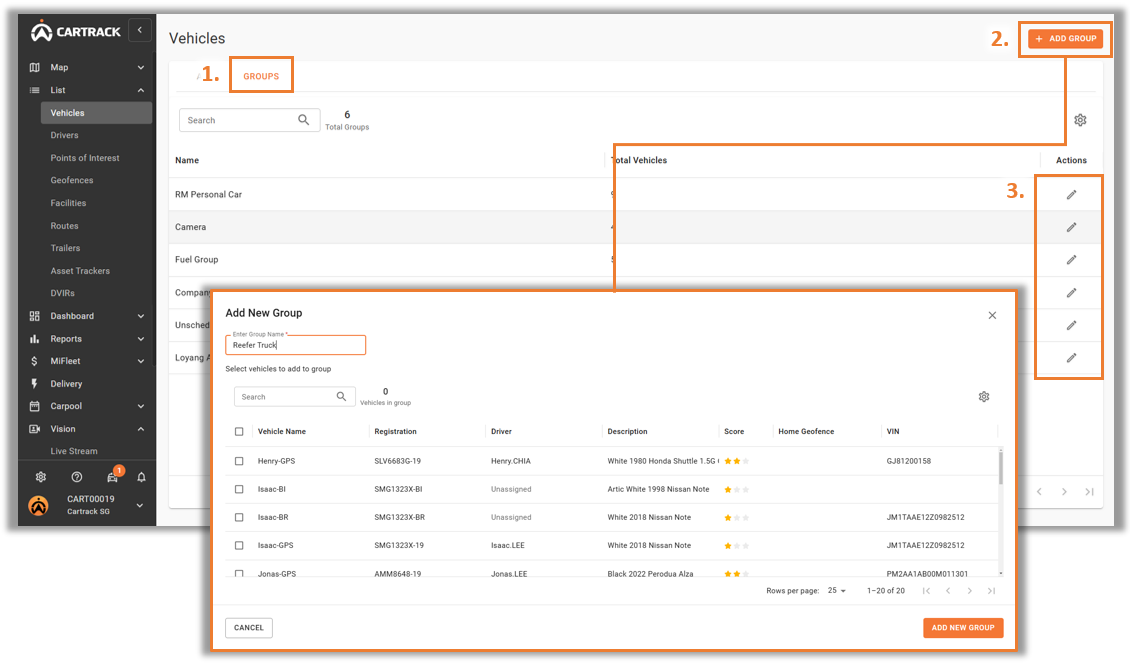
1. Select “Group” in Vehicles.
2. Select “Add a Group” to create a new grouping. Input a name and select the vehicles to be included in the grouping.
3. Click on the " " icon to edit or delete a group.