 Chinese (Hong Kong)
  English
  Chinese (China)
  Indonesian
  Malay
Malay  Polish
  Portuguese
  Spanish
  Thai
Thai  Arabic
  Tagalog
  Vietnamese
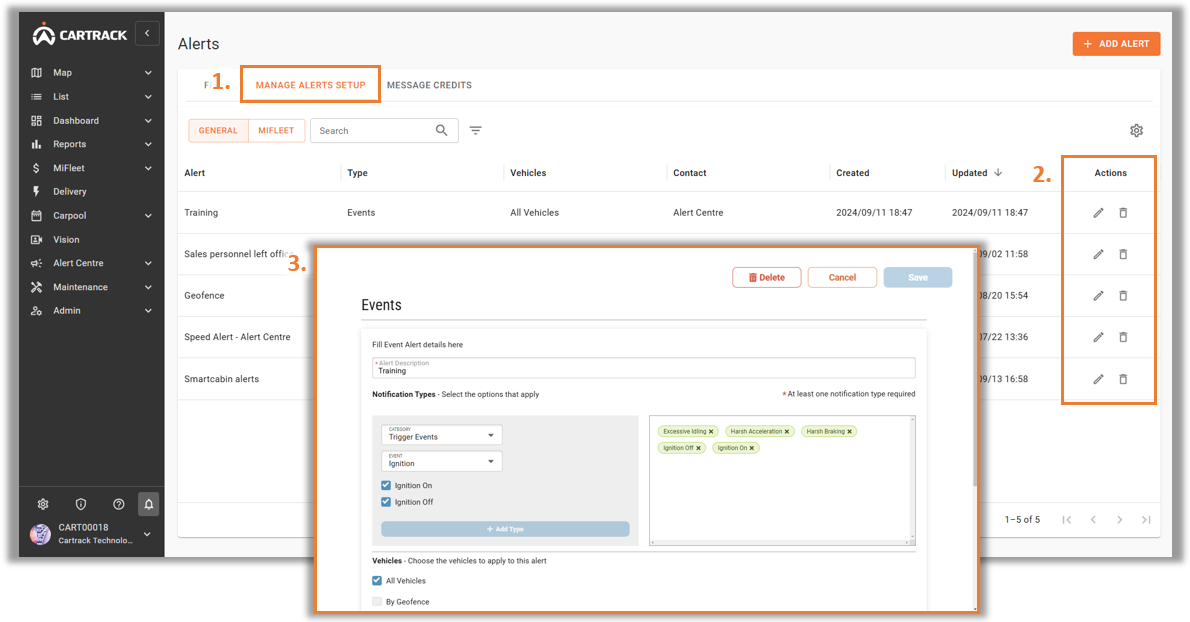
 1. 選擇 “Manage Alerts Setup” 标签。
2. Identify the Alert that you wish to edit or delete and click on the " " 图标或 "
 " 圖示。
" 圖示。
3. A pop-up menu will appear to edit or delete the alert.

1. 選擇 “Manage Alerts Setup” 标签。
2. Identify the Alert that you wish to edit or delete and click on the "" 图标或 "" 圖示。
3. A pop-up menu will appear to edit or delete the alert.


